Looking for the previous Perfingo app? It's moved to classic.perfingo.com.

What's new

Better for couples, easier imports

This update is about two things: planning as a couple, and getting your statements in with less effort.

Couple view

See your money, theirs, or both.

Switch between Us, You and your partner on Home, Cashflow, Tracking and Investment.

Try it on Home Opens the app
Tap to switch
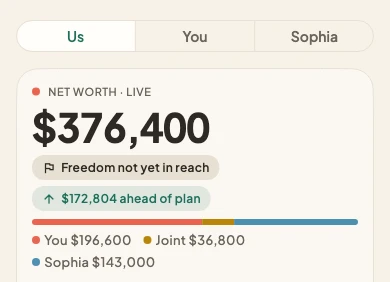
Home with the Us, You and partner switch, showing a shared net worth split between both partners.
Statement import

One place for every statement.

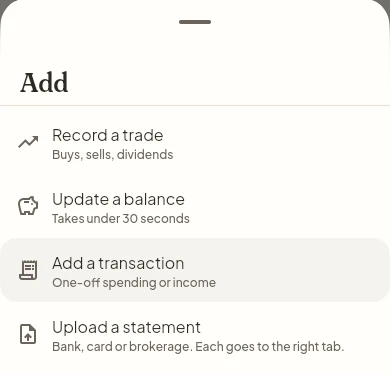
Upload from Home and we file it in the right tab. Locked PDFs work too, and we only ask about rows that need a second look.
Upload a statement Opens the app
Upload from Home
The Add menu on Home, with Upload a statement below Record a trade, Update a balance and Add a transaction.
Plan

Sharper CPF numbers after 55.

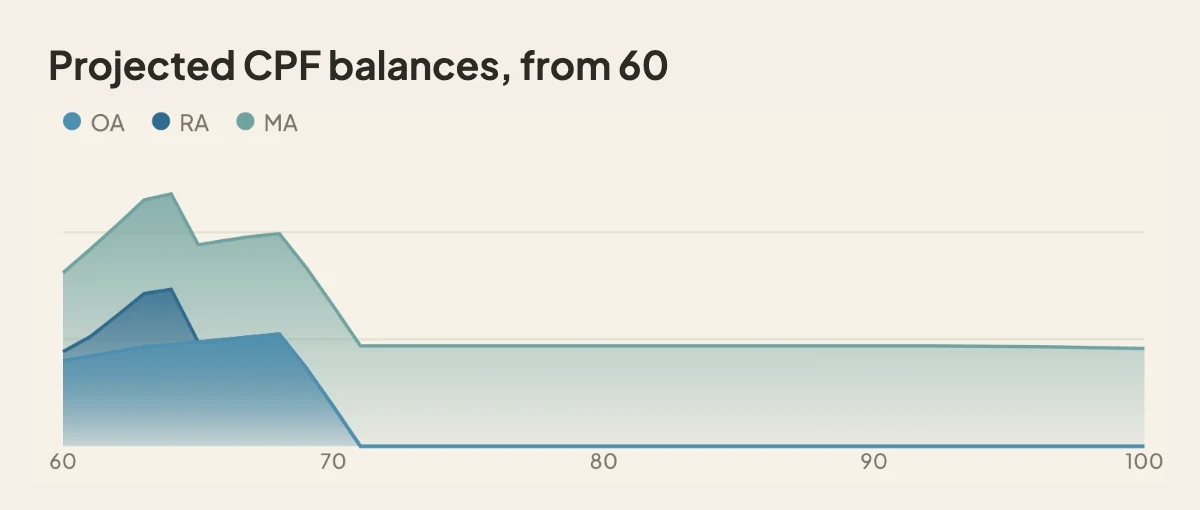
Your plan now follows CPF rules more closely after 55. See your OA, RA and MA year by year.
See my CPF Opens the app
Your OA keeps earning after 55
A chart of projected OA, RA and MA balances from age 60 to 100.

Also new

Smaller things you might notice.

See 10 smaller changes

Cashflow

  • See which statements each month still needs, and upload them one after another.
  • Tap any month on the chart to see what came in and where it went.
  • Budget vs actual now shows what you planned to invest next to what you did.

Statement import

  • Locked PDF? Enter its password and we open it. We never keep the password.
  • After each import, we check the numbers add up and point out anything that seems missing.
  • Not sure how we sorted a statement? You can choose to save it so we sort better. Only if you say yes.

Investments

  • Brokerage statements show what changed since last time, including dividends, fees and cash.
  • Cash at your broker counts in your net worth. Moving money to your broker counts as investing.

Couple view

  • Add a statement for your partner. We work out whose account it is, and they see you added it.

Account

  • A short What's new note after each update, like this one.

Smoother and more accurate

11 fixes, in three groups.

4 fixes

More accurate plans

CPF after 55, the latest housing, stamp duty and tax rules, and no freedom age until you add spending.

3 fixes

Smoother imports

Clear reasons when a file can't be read, quicker reviews, and better handling of tricky brokerage rows.

4 fixes

Little things

Monthly check-ins, partner invites, advisor access on weak connections, and a few blank screens.

See all 11 fixes

More accurate plans

  • After 55, your OA stays open and keeps earning interest, and CPF contributions grow your RA and CPF LIFE payout.
  • Housing, stamp duty and income tax use the latest rules. For an EC or new launch condo, we assume keys 3 years after signing. You can change this in Housing.
  • If you haven't added spending yet, we ask you to, instead of showing a freedom age that isn't real.
  • Your plan updates again after you change how a goal saves.

Smoother imports

  • When a file can't be read, we tell you why: a wrong password, too many pages or a file that is too large.
  • Changing one category can update similar rows. A statement without dates goes under the month of its transactions.
  • Brokerage questions you leave for later wait on the holding, dividend withholding tax shows as tax, and rows missing an exchange rate can be retried.

Little things

  • The monthly check-in sums up the month you are closing, and no longer saves the same balance twice.
  • An invited partner sees the name of the person who invited them.
  • Advisors can open a client's plan more reliably on a weak connection.
  • No more blank screen after deleting a bank account, and a new account on a shared device gets its setup steps.

Earlier updates

16 Oct 2026 Plan for costs that end and money you expect 1 Oct 2026 A note for every update See the full journal
Version 2026.10.1 Found a problem? Tell us